



Discover What's New in PropertyIntel
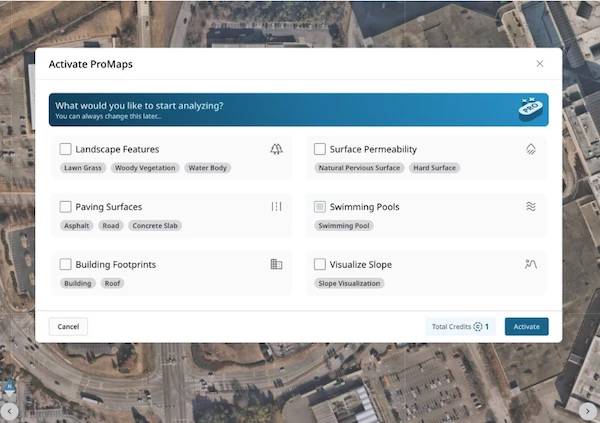
We've tightened up the ProMaps workflow so you can go from property address to AI-driven data layers faster than ever.
-
Streamlined Flow: Simplified data pack selections have moved to the first step, parcel boundaries are now auto-highlighted, and selected packs enable themselves automatically when the flow wraps up.
-
Time-Matched Data: Change the capture date and your ProMaps data layers update to match — so you're always analyzing data that reflects the background you're looking at.
-
Boundary Limit Indicator: Defining an area that's too large? The boundary line turns red in real time and a banner tells you exactly how to shrink it before submitting.
-
Reliable Boundary Editing: Click the ProMaps boundary to select it, drag vertices to reshape, or hit delete to start fresh — just like any other polygon in the app.
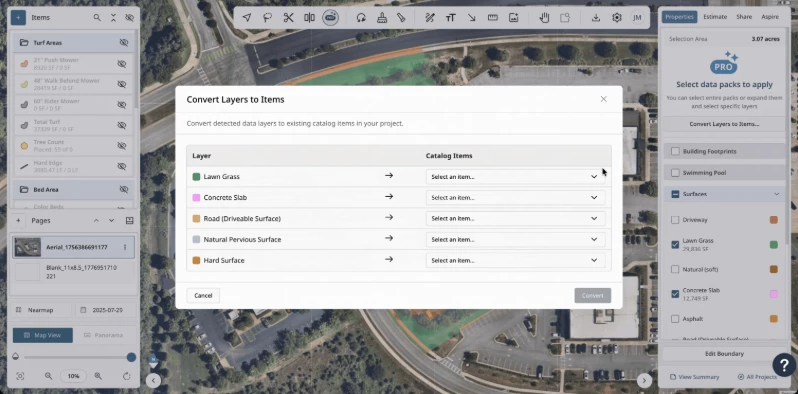
NEW — Bulk Convert Data Layers to Catalog Items
Take the manual work out of turning ProMap data into your takeoff. Select multiple data packs at once and convert them into catalog items in a single action — quantities, attributes, and all.
-
One-Click Bulk Selection: Pick multiple active data packs from the list and convert them together instead of one at a time.
-
Flexible Catalog Matching: Don't see the right catalog item? Use "Create Item" right from the dropdown to spin up a new material using the data layer name.
-
Clear Status at a Glance: Instantly see which layers have already been associated with a catalog item so you never double up.
This feature is only available for Advanced tiers and above.
Refinements to the tools you use every day and a handful of polish fixes based on your feedback:
-
Finish Current on New Tools: The familiar "Finish Current" button now works with the Line Tool for Objects and the Path Tool for Areas, letting you wrap up a path and stay in the tool to start the next one.
-
Linked Fill & Stroke Colors: Area strokes now match your fill by default and stay linked as you update colors. Unlink any time you want to style them independently.
-
Copy Reference Maps: Duplicate a reference map within a property in a single click — including image files, pins, and positioning — so you can quickly spin up variations.
-
Better Legend Control: Legend groups now reflect a hidden state when all contents are toggled off, and you can re-enable individual items without extra clicks.
-
Clean Icon Display: Object selector icons are properly sized and centered so you can see every option at a glance.
-
Accurate Export Capture: Exported project images now wait for the map to finish rendering before snapping — no more misaligned annotations.
-
Consistent Text Labels: Text background scales proportionally with text size at every zoom level so labels stay legible.