Solved

T&M Already Started, How do I add additional work ticket items that were not foreseen and put into the T&M originally?

  • November 4, 2024
  • 4 replies
  • 215 views

Forum|alt.badge.img+2

I created a T&M and Started the T&M already **


I did not add any work ticket items from outside my inventory. Now i need to add items but i cannot make a purchase receipt since i have no items to click. 

Best answer by Scott Knussmann

You can still make a purchase receipt it just cant be done from the ticket itself since there are no materials estimated.  You would have to create the purchase in the purchasing assistant calling out that specific ticket.  Make sure you do not complete the t&m ticket until you get those materials allocated or it will not capture the costs and provide mark ups for the invoice.  I hope that is helpful!

4 replies

baraica
Community Manager
Forum|alt.badge.img+28
  • Community Manager
  • November 4, 2024

Hi @nickneavegroup.com - have you tried adding a change order yet? 


Scott Knussmann
Forum|alt.badge.img+13
  • Participating Frequently
  • Answer
  • November 5, 2024

You can still make a purchase receipt it just cant be done from the ticket itself since there are no materials estimated.  You would have to create the purchase in the purchasing assistant calling out that specific ticket.  Make sure you do not complete the t&m ticket until you get those materials allocated or it will not capture the costs and provide mark ups for the invoice.  I hope that is helpful!


Forum|alt.badge.img+2

Ty. There’s also a new purchase button in the Quick Look up button on the right hand side. I appreciate the help 


SoboYiW
Forum|alt.badge.img+22
  • Brainy
  • November 19, 2024

Since you do not have an item in your original estimate.  so you can’t create purchase receipts from


  1. work ticket screen
  2. purchasing assistant screen

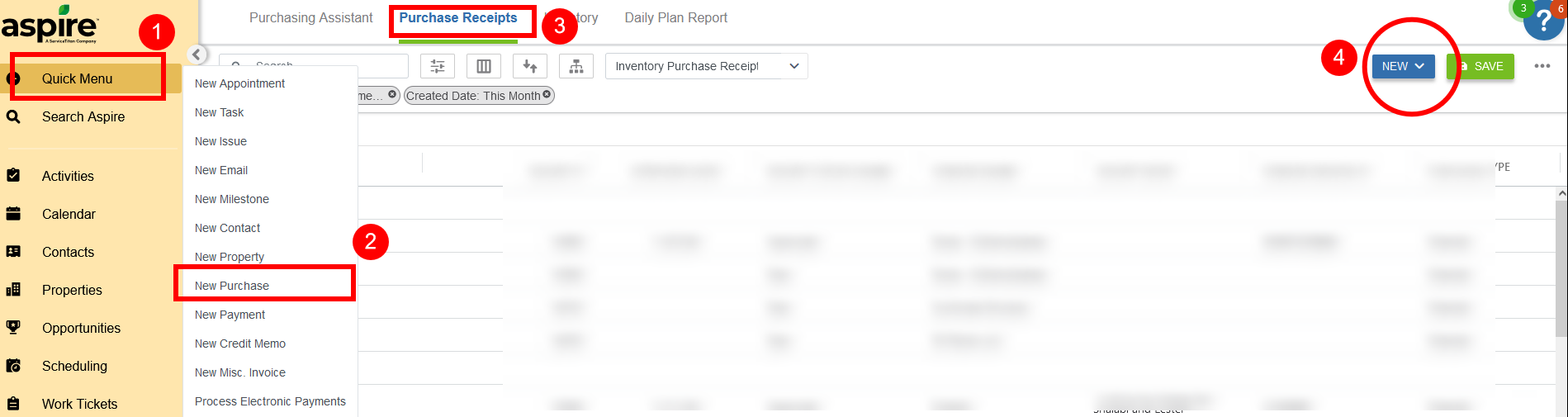
but you can create a purchase receipt by quick menu (step 1 &2)

or under the purchase receipt tab (step 3 & 4), there is a + plus button to select (add a purchase receipt or a purchase credit).