
Question

Price Increases w/ Spray Contract Renewals

  • Nov 24, 2026 8:05 PM UTC
  • 2 replies
  • 14 views

Forum|alt.badge.img+6
  • Participating Frequently

This is our first year renewing our spray contracts and we’re doing price increases at the same time. We also had to change some kits/add new kits to some rounds, which we learned the hard way meant creating a “new” opportunity since Aspire would not renew properly with new kits attached. 


Anyway, we’re on to the headache of price increases. They’re based on how long they’ve been a client and nothing to do with the standard “per round” cost in Aspire, meaning some clients are going up 2%, some 3%, etc. Are we correct that the only way to do this increase is line by line per opportunity? We feel like this cannot possibly be the easiest way to accomplish this when it’s taking multiple labor hours to work our way through the client list. 

2 replies

Forum|alt.badge.img+11
  • Inspiring
  • Nov 24, 2026 9:04 PM UTC

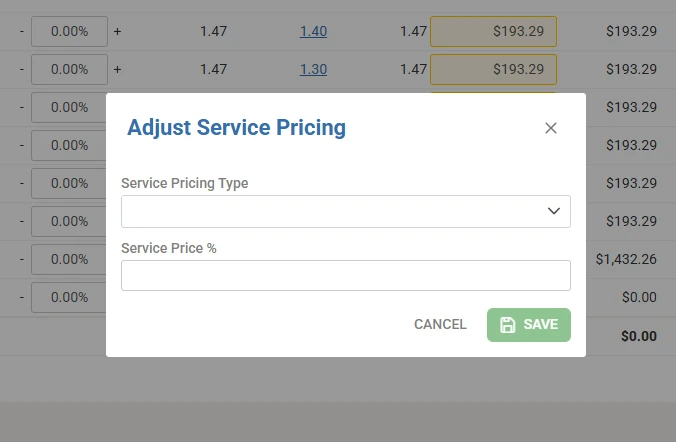
You’ll still have to go opportunity by opportunity, but you can update service prices on each opportunity in bulk by either service price percentage, service gross margin percentage, or change the total fixed price and it will raise the service prices to reach that total fixed price. You can go to the 3 dot menu in the estimate screen and choose Adjust Service Pricing to do this. We base our maintenance and agronomics renewals on a number of factors like labor/material variances as well as how long we’ve had the client and what our relationship looks like with them, so we do make all of our adjustments on a service by service basis, but if you’re just trying to raise all services by a certain percentage, this is the fastest way I can think of. 


Forum|alt.badge.img+1
  • Participating Frequently
  • Nov 24, 2026 9:55 PM UTC

You can apply the increase once per opportunity and update all the spray rounds on that estimate. Aspire’s bulk renewal can create multiple renewal opportunities at once, but its documented pricing options are to carry forward prior service prices or recalculate from catalog costs and markups. There’s no percentage increase field in the bulk renewal dialog, even if you batch the 2% and 3% customers separately.

For the renewals and new opportunities you’ve already created, open Estimate → ⋯ → Adjust Service Pricing → Service Price %. Enter 2% or 3% for that customer, and Aspire applies it to all services on the estimate. If the option is missing, ask your admin to check whether your role has the Adjust Total Price by % permission.

For contracts with the same rounds and kits, I’d bulk renew using Keep previous Service Prices from renewal, then apply each customer’s increase. For the ones with kit changes, verify the starting prices first. Aspire says a renewal can reload a customized kit from the catalog and change the service price even when you select Keep previous Service Prices. 


Vish Cornelius