
Solved

I ran into an issue adjusting pricing in an estimate

  • June 9, 2025
  • 4 replies
  • 102 views

Emily M
Forum|alt.badge.img+5

Hello all,

I’m trying to adjust a price for a kit in Aspire to adjust the margin, but when I type in the new number, a notification pops up that says, “You can only reduce the price by 0%.” It doesn’t let me change the price. It only happens sometimes but happens for things both catalog and one-time items.

Has anyone run into this problem before? Do you have any idea how to fix it?

Thank you,

Emily 

Best answer by Kbaird

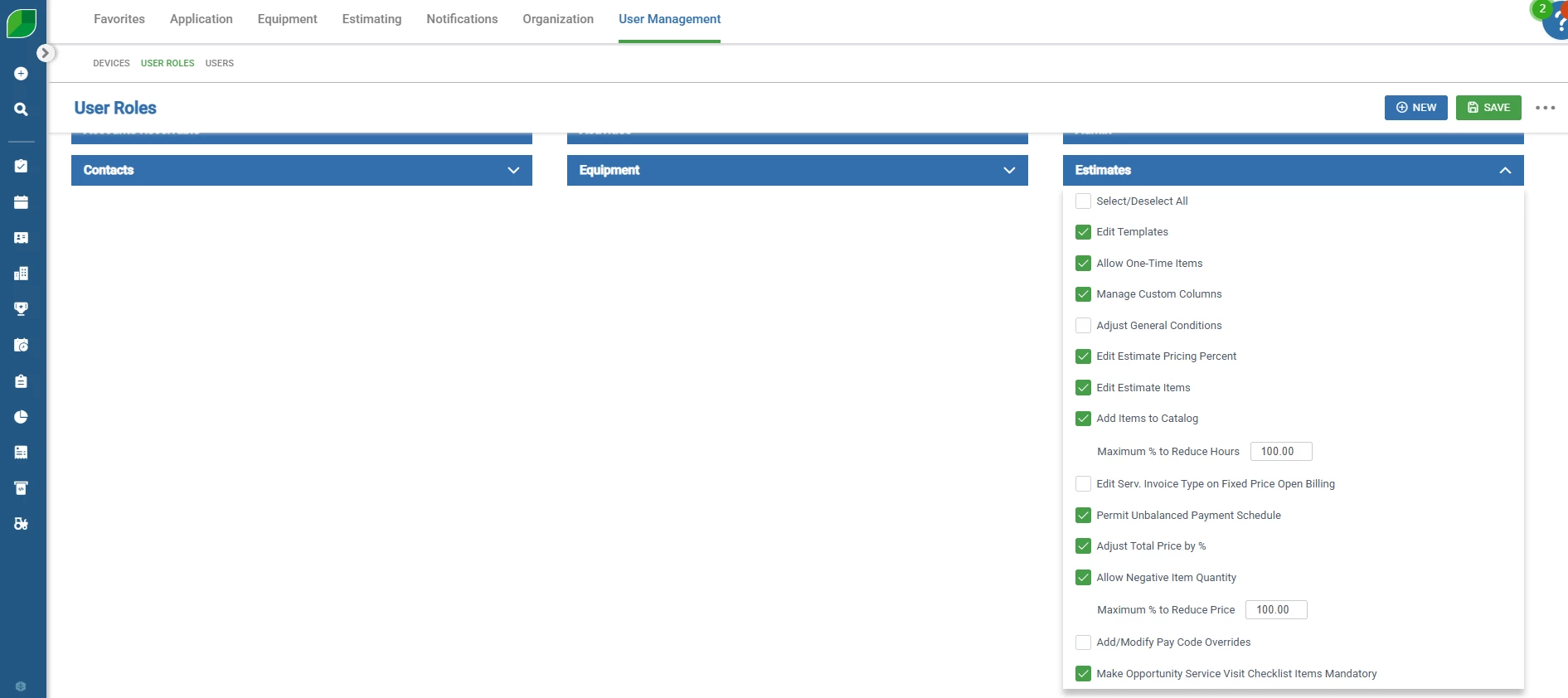
Hey Emily! This has to do with your user settings in the admin console. Your role doesn’t have the proper permissions to adjust item prices in an estimate. Get with your system admin to adjust your role!

4 replies

Kbaird
Forum|alt.badge.img+18
  • Brainy
  • Answer
  • June 9, 2025

Hey Emily! This has to do with your user settings in the admin console. Your role doesn’t have the proper permissions to adjust item prices in an estimate. Get with your system admin to adjust your role!


Emily M
Forum|alt.badge.img+5
  • Author
  • Participating Frequently
  • June 9, 2025

Thanks Keenan! Found the spot to change it.


Forum|alt.badge.img+1
  • New Participant
  • January 20, 2026

Hi Emily and Keenan,

I am new to Aspire and am having the same issue. I am making a work order for some free warranty work, and have made an estimate to generate the work order, but I need to be able to change the price to $0 so the client is not billed. My boss has changed the settings a couple times, but it now only allows me to change the price 20%, and he is not sure why it isn’t 100%. Are we missing something here? Thanks!


Emily M
Forum|alt.badge.img+5
  • Author
  • Participating Frequently
  • January 20, 2026

Hi Makapants,

It sounds like you’ve got the problem half-solved. In admin > user roles > whichever role you are > estimates, make sure that the box is checked to allow you to adjust labor and adjust price up to 100%. That should allow you to make a $0 service.

Aspire acts weirdly around discounts. If you want the revenue from the service to still show up but then have a separate discount, there is another way to do it. You need to create a one-time or catalog item called “Discount”. I’ve made one that’s “ea” and one that’s “$” depending on what I need it for. Under the same service as the item you want to discount, add the Discount item, make the price match what you want to discount, and make the quantity -1. That should allow you to enter the discount.