Question

Email not sending Issue

  • March 20, 2026
  • 17 replies
  • 139 views

Forum|alt.badge.img+3

Invoice emails are not sending at all. They show up under the email sent log, but there is no time or date for sending. Has anyone had this issue, or know how to fix?

17 replies

baraica
Community Manager
Forum|alt.badge.img+30
  • Community Manager
  • March 20, 2026

Hello ​@JLSOfficeManager, you want to start off by making sure the branch is active. I will send you a private message right now with more details. 


mhellweg
Forum|alt.badge.img+11
  • Inspiring
  • March 27, 2026

Or make sure your email is synced? I’ve had something similar happen. 


Forum|alt.badge.img+3
  • Participating Frequently
  • July 14, 2026

We are currently having the same issue. We’ve had multiple issues with invoice emails in the last few months and I’d love some troubleshooting or a checklist so I can verify our account is set up correctly. The ones I attempted to send yesterday did not go through my email, drafts is empty and they are not in sent emails. Branch is active.


mhellweg
Forum|alt.badge.img+11
  • Inspiring
  • July 14, 2026

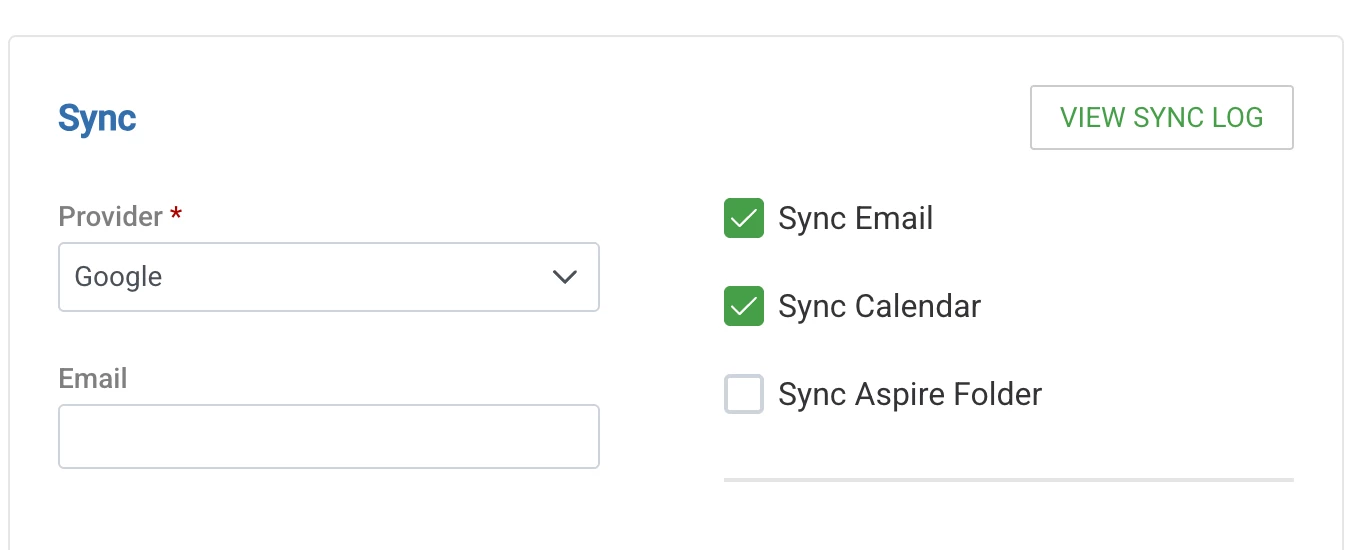
@TDLAccounting have you verified your email is sync’d? That’s happened to me. In your profile you can view the sync log (sorry if you already tried that). 


Forum|alt.badge.img+3
  • Participating Frequently
  • July 14, 2026

Can you point me in the right direction where I can check that? I’m fairly new to aspire, but that sounds like it could absolutely be the problem.


mhellweg
Forum|alt.badge.img+11
  • Inspiring
  • July 14, 2026

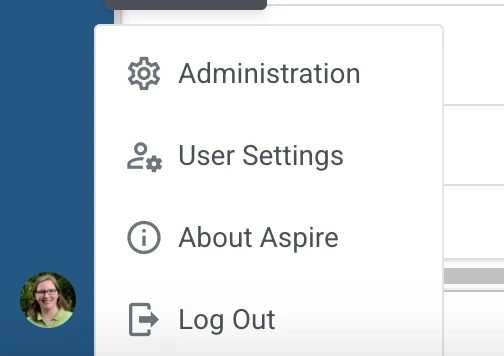
@TDLAccounting see below - go to your user settings (lower left) and then you can click on the view sync log. Hope it helps. Make sure whichever profile you use to send invoices is sync’d. We have a unique login for our AR so it has it’s own email address etc. 


Forum|alt.badge.img+3
  • Participating Frequently
  • July 14, 2026

Actually, I found it! It looks like our invoices are being sent by a user that no longer exists.


mhellweg
Forum|alt.badge.img+11
  • Inspiring
  • July 14, 2026

That could be the problem! : ) Those ghost users are terrible at getting their work done.


Forum|alt.badge.img+3
  • Participating Frequently
  • July 14, 2026

heehee! Thanks for your help!


mhellweg
Forum|alt.badge.img+11
  • Inspiring
  • July 14, 2026

@TDLAccounting Thanks for letting me feel “useful”. : ) 


Forum|alt.badge.img+3

For me it was indeed a syncing issue. I was new and removed our former office manager from the system, from whom the emails had orginally been sent from. I thought I had switched the email to my account, but I didn’t go through the steps correctly.


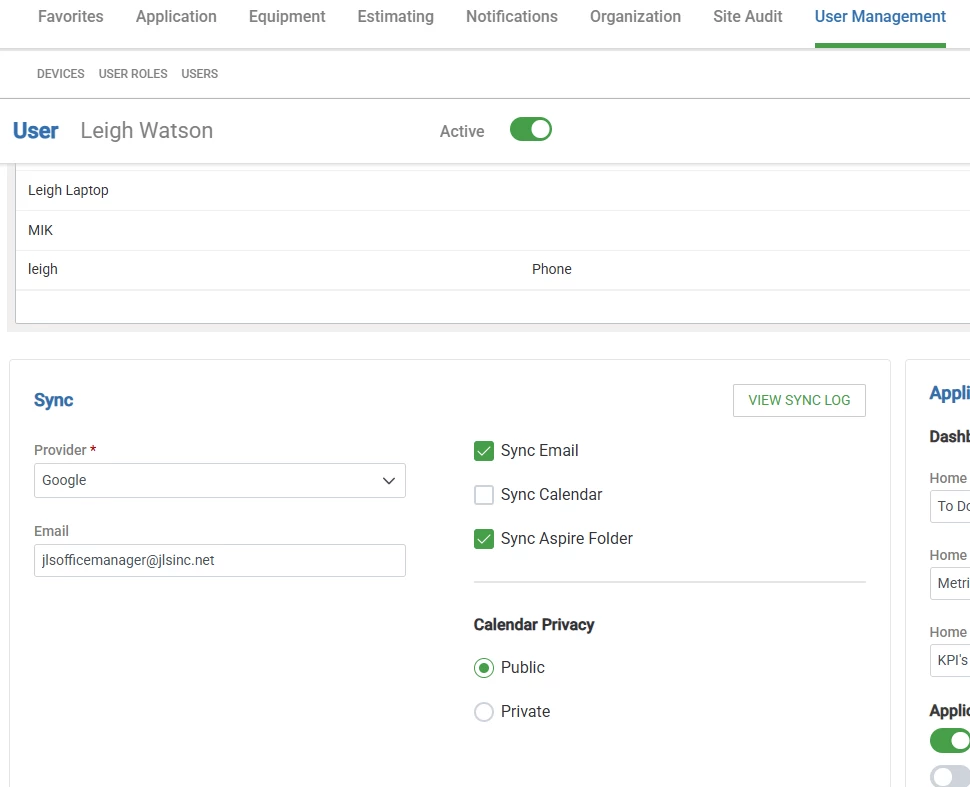
To start, I selected Administration at the bottom of the left hand menu in Aspire. From there go I went to user management,  clicked on users, selected myself, and made sure my email has been properly added and synced. 


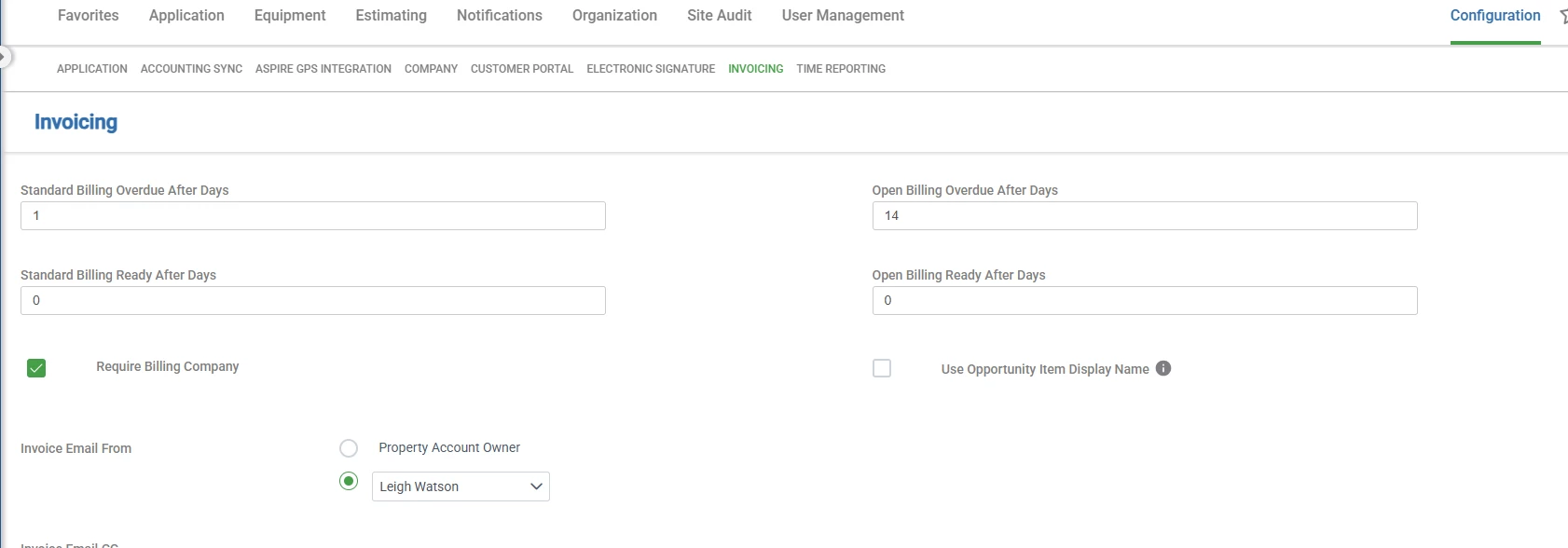
I then went into invoicing to check I was the person who the email comes from.

To do that from the administration screen, I clicked on configuration in the upper right. Clicked on invoicing on the menu, and confirmed that my name and email is the email selected for invoicing.

Once that was done, my emails finally started going through. 

I hope that this helps for you as well! 


swirtholg
Forum|alt.badge.img+12
  • Participating Frequently
  • July 15, 2026

It sounds like this issue has been solved at this point but for future readers- 

  1. Yes, use active users
  2. Yes, sync contact- The Aspire sync token lasts for 90 days and refreshes when you sign in. For that reason, we recommend resyncing your email every 90 days. In this instance your customer was still able to receive the emailed proposal so this was more of a  temporary communication issue between Aspire and the client's email server.
  3. I believe this should be part of the client onboarding with aspire, but we weren’t aware until after we were having issues.  As of February 2024, major email providers (Google, Yahoo, and others) began enforcing stricter email authentication requirements. In order for Aspire to send emails on your behalf (invoices, portal invites, purchase receipts, etc.), your DNS must authorize Aspire as an approved sender.


  4. Action needed from your IT team: Please have your IT consultant or email host provider verify that your domain's SPF record includes: `include:smtp.youraspire.com`


    A full SPF record example looks like: `v=spf1 include:smtp.youraspire.com -all` *(Your IT team may need to merge this with any existing SPF entries — do not create a second SPF record.)*
     

mhellweg
Forum|alt.badge.img+11
  • Inspiring
  • July 15, 2026

@swirtholg Thank you so much for sharing that!


Forum|alt.badge.img+3
  • Participating Frequently
  • July 15, 2026

Actually it’s not solved yet, unfortunately.


We had a similar situation to JLSOfficeManager in that our office manager quit and someone made her contact inactive. I have created a new contact for accounting, gave it system admin privileges, ensured that the email syncs, changed the invoice from in configuration, but when I go into an email it still is sending from the old contact. 

What step am I missing? It has worked in the past 60 days, but that may have been before the old contact was inactivated.


Thanks everyone!


mhellweg
Forum|alt.badge.img+11
  • Inspiring
  • July 15, 2026

Hopefully this has been fixed (or AspireCare helped figure it out). I wonder if you just reactivate that old contact for now, even if you change the name of it etc. just to get those invoices out? Sorry this is happening… 


Forum|alt.badge.img+3
  • Participating Frequently
  • July 15, 2026

Found it! It was in branch settings, there’s a whole invoicing thing in there!


mhellweg
Forum|alt.badge.img+11
  • Inspiring
  • July 16, 2026

Yay!