Question

A/R aging report grouped by parent company instead of by property?

  • Oct 29, 2026 6:12 PM UTC
  • 4 replies
  • 29 views

Forum|alt.badge.img

Our A/R reports break out by property. For collections, I need the totals rolled up to the parent company. For example, a property management company with 15 properties should show one total balance, with its properties and invoices listed underneath.


Ideally the report would:

- Group by company, sorted by total balance (highest first)

- Show each property's invoice #, invoice and due dates, original amount, remaining balance and days past due

- Include aging buckets: Current, 1-30, 31-60, 61-90, 90+

- Filter by account manager, aging period or customer

- Export to Excel and save for reuse


Is there a standard report that does this, or a way to build it with custom reporting? Any setup tips are appreciated. Thanks!


4 replies

Forum|alt.badge.img
  • New Participant
  • Oct 29, 2026 7:31 PM UTC

Hi,

I would start with Aspire’s Receivables/Aging report and check the grouping option for Company Name. Aspire documents this setup with property details and aging buckets. The key is making sure the properties are associated with the same company record.

For the invoice-level detail, the Invoice List can provide company, property, account manager, invoice number, invoice date, original amount, and unpaid balance. Depending on the fields available in your setup, you may need an Excel export to combine everything into the exact layout you described—with company subtotals, properties and invoices underneath, and the largest balances first.

One detail to watch: an unpaid-invoice list may exclude unapplied payments or prepayments, so it should be reconciled to the Receivables report before using it for collections.


Vish Cornelius

vish.cornelius@gobeeteam.com

714-277-0145


Kbaird
Forum|alt.badge.img+26
  • Genius
  • Oct 29, 2026 8:24 PM UTC

Heyo,

Your trouble is going to be that the information you want is spread across Invoices and Receivables. You can’t see invoice numbers in receivables, and you can’t see grouped aging in Invoices. 

The API would probably be the best bet to generate this as a report every week in the format you want.

Otherwise I would group Invoices by company, then by property, then sort by aging days. 


Forum|alt.badge.img+2
  • Participating Frequently
  • Oct 29, 2026 9:35 PM UTC

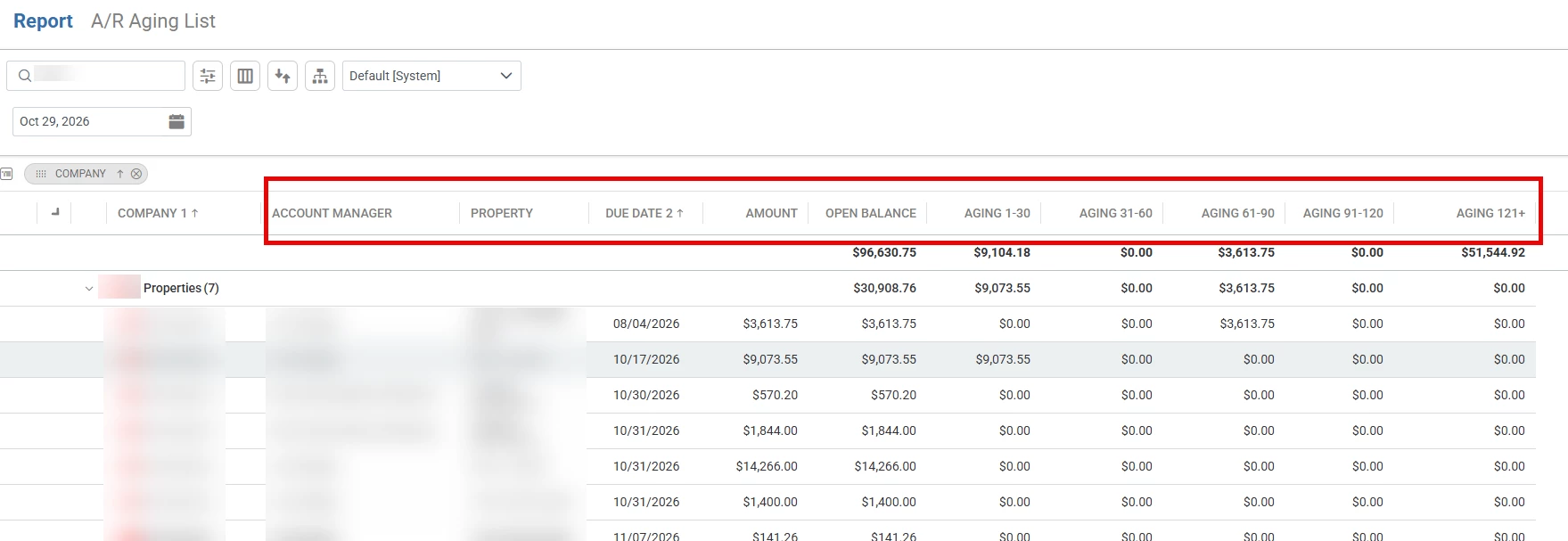
​@1033 I think the AR Aging List in reports checks your boxes. 


Can group by company shows Invoice Detail with Aging buckets. Can filter by AM and export to excel. 


Forum|alt.badge.img
  • New Participant
  • Oct 29, 2026 9:46 PM UTC

g.malmberg


Yes! This report clicks all the boxes.