Question

Why can I change past payment schedule amounts and not others?

  • January 30, 2026
  • 5 replies
  • 48 views

Forum|alt.badge.img+9

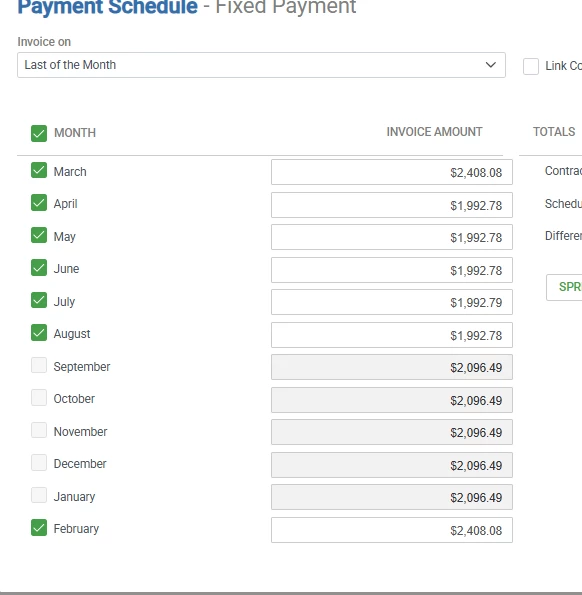
I don’t really understand why I can change any past months payment schedule amounts as those invoices have already been processed and paid. However, even more confusing is why some can be changed and not others? In this screenshot, this client started in March. They had a pricing change mid, year, and now are on another pricing change. Why is this what the payment schedule screen looks like when I open it? April-August have already been paid so why aren’t they greyed out like sept-jan?

 

5 replies

Forum|alt.badge.img+1
  • New Participant
  • February 2, 2026

I get the sense that this opportunity was created at the time of the mid-year pricing changes, and that the March that’s showing in your screenshot is actually this coming March, not the original/previous March that the last agreement started in. If what I’m thinking is true, the start and end dates on the opportunity page will reflect a start sometime in 09/2025 and an end date of most likely 08/31/2026.


Forum|alt.badge.img+9
  • Author
  • Participating Frequently
  • February 2, 2026

I get the sense that this opportunity was created at the time of the mid-year pricing changes, and that the March that’s showing in your screenshot is actually this coming March, not the original/previous March that the last agreement started in. If what I’m thinking is true, the start and end dates on the opportunity page will reflect a start sometime in 09/2025 and an end date of most likely 08/31/2026.

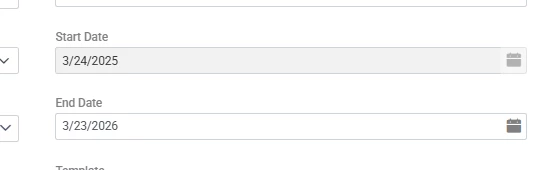
Nope, contract dates are as follows:


SoboYiW
Forum|alt.badge.img+22
  • Brainy
  • February 3, 2026

When reviewing the contract start and end dates, it appears the issue is that this contract exceeds a 12-month term.

In Aspire, payment schedules can only be set for a maximum of 12 months. However, this contract includes 13 months of payments (resulting in a duplicate March). As a result, the system generates both a March 2025 invoice and a March 2026 invoice, which causes confusion in the Invoice Assistant.

To avoid these issues, we have established a rule to not build contracts longer than 12 months in Aspire. Instead, we recommend using the Renew function to extend contracts beyond the initial 12-month term.


And user role permission, there is a permission “ Permit Unbalanced Payment Schedule” under estimate tab. I’m wondering if your user role enable this permission, while other user role disable. 

Thanks, 


Forum|alt.badge.img+9
  • Author
  • Participating Frequently
  • February 3, 2026

When reviewing the contract start and end dates, it appears the issue is that this contract exceeds a 12-month term.

In Aspire, payment schedules can only be set for a maximum of 12 months. However, this contract includes 13 months of payments (resulting in a duplicate March). As a result, the system generates both a March 2025 invoice and a March 2026 invoice, which causes confusion in the Invoice Assistant.

To avoid these issues, we have established a rule to not build contracts longer than 12 months in Aspire. Instead, we recommend using the Renew function to extend contracts beyond the initial 12-month term.


And user role permission, there is a permission “ Permit Unbalanced Payment Schedule” under estimate tab. I’m wondering if your user role enable this permission, while other user role disable. 

Thanks, 


But, the contract is set to exactly 12 months in the dates above, not exceeding 12 months. And, many of the months after March are also showing as editable even though the have already been processed and paid. In my mind the only ones that should be allowed to be edited are the remaining months that haven’t been processed yet. 


SoboYiW
Forum|alt.badge.img+22
  • Brainy
  • February 3, 2026

When reviewing the contract start and end dates, it appears the issue is that this contract exceeds a 12-month term.

In Aspire, payment schedules can only be set for a maximum of 12 months. However, this contract includes 13 months of payments (resulting in a duplicate March). As a result, the system generates both a March 2025 invoice and a March 2026 invoice, which causes confusion in the Invoice Assistant.

To avoid these issues, we have established a rule to not build contracts longer than 12 months in Aspire. Instead, we recommend using the Renew function to extend contracts beyond the initial 12-month term.


And user role permission, there is a permission “ Permit Unbalanced Payment Schedule” under estimate tab. I’m wondering if your user role enable this permission, while other user role disable. 

Thanks, 


But, the contract is set to exactly 12 months in the dates above, not exceeding 12 months. And, many of the months after March are also showing as editable even though the have already been processed and paid. In my mind the only ones that should be allowed to be edited are the remaining months that haven’t been processed yet. 

Hi Brendon, 

Correct, this is another situation that we normally avoid. For any contract, we set start date as the first day of the month. 


If the client would like to be served for two weeks or one week before the contract starts. We will create a work order to generate tickets for that temporary period. 

So for week March 24, 2025 to March 31, 2025, it will be a one week work order and client will pay for this week. 


Then we have client signed a full 12 month contract, starting from 04/01/2025 to 03/31/2026. Then we will work on the normal contract renewal process. 

Hope this helps. We had experienced a lot errors with the contract date. Then we decide to avoid any middle month start date or any multiple year contract.