Question

Vehicle Inspections

  • September 10, 2025
  • 6 replies
  • 123 views

Forum|alt.badge.img+2

Hello,

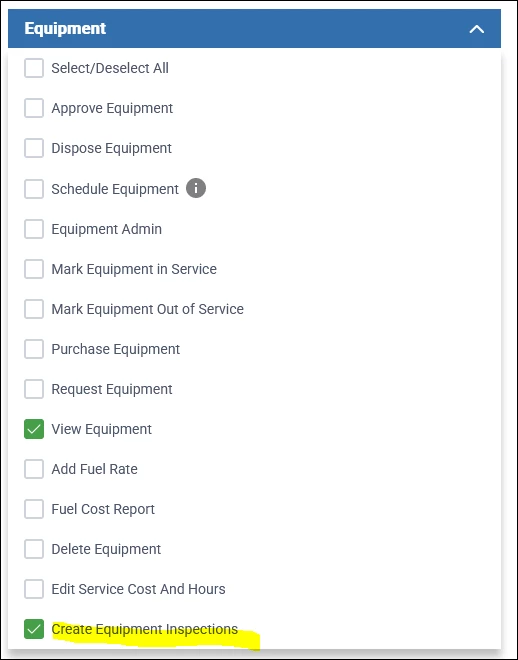
I am trying to set up inspections in Aspire Mobile for Crew Leaders. We have given the “Create Equipment Inspections” permission under User Roles. When I log in under my test crew leader all I can do is clock in under the route and request equipment repairs.

However, when I log in Aspire Mobile as myself-System Admin and Crew Leader-I can see and perform a vehicle inspection.

I have not been able to find Aspire Mobile inspection information in Knowledge base either.

I would appreciate any help with this.

Thank you,

Angie

6 replies

SoboYiW
Forum|alt.badge.img+22
  • Brainy
  • September 10, 2025

Hi ​@ASones , 


The equipment must be assigned to a specific route. (through equipment module)

Only that specific route crew leader log into Aspire mobile will see that equipment. (check the scheduling board > route management or click into a specific route to view the crew leader).


Then under your crew leader user role, make sure create equipment inspection box got checked. 


Thanks, 


SoboYiW
Forum|alt.badge.img+22
  • Brainy
  • September 10, 2025

We’ve noticed a recurring issue where inspections don’t always sync back to Aspire Cloud.

Here’s what happens: when a crew leader submits an inspection, the Aspire mobile app will show the date and time it was completed. But sometimes that inspection never makes it up to the Cloud. So, when reviewing who hasn’t completed their inspections and sending reminders, just keep in mind that the crew leader may have already done it on their end.

This has been going on for the past few months, and we’ve reported it to the Aspire Care team. If you’re running into the same problem, it would be super helpful if you could also submit a ticket to Care — the more reports, the higher the priority.

Thanks for helping push this forward!


Forum|alt.badge.img+2
  • Author
  • New Participant
  • September 10, 2025

SoboYiW, Thank you for your replies. I will see what I can work out with the new information! Happy to report to the Care Team if I run into any problems.


Forum|alt.badge.img+2
  • Author
  • New Participant
  • September 18, 2025

Update! I was able to get the inspections set up to work in Aspire Mobile. You were a great help. The area that I ran into trouble was not having vehicles assigned to routes.

I do have another question. Is there a way to time inspection prompts similar to how mileage prompts can be set for a specific day when clocking out? i have tried searching Aspire Knowledge and the User Guide...I am not sure if I am just not using the correct words on the searches.


Thank you again.


Forum|alt.badge.img+11
  • Employee
  • September 19, 2025

Hi ASones, 

Right now there isn’t a way to trigger the equipment inspection forms in Aspire Mobile. What we’ve seen work well is building it into an SOP so crews know when to complete them. For example, you could tie it into their weekly equipment process so inspections just become part of the routine.

That way it’s consistent and doesn’t get missed.


Forum|alt.badge.img+2
  • Author
  • New Participant
  • September 19, 2025

Thank you JCruz,

Helpful information on the SOP idea. Thank you for confirming there is no scheduling option for the inspections, too.