Question

Price List for Items in the Item Catalog

  • December 16, 2025
  • 13 replies
  • 67 views

Forum|alt.badge.img+11
  • Participating Frequently

Anyone know where I can find information about what the Price List is for an item in the Item Catalog?

I’ve looked in the Academy and the Knowledge Base and can’t find any information.

13 replies

Kbaird
Forum|alt.badge.img+17
  • Inspiring
  • December 16, 2025

They’re used to setup pricing for multiple branches. You set up price lists in the branches part of the admin tab


Forum|alt.badge.img+11
  • Author
  • Participating Frequently
  • December 16, 2025

Thanks ​@Kbaird.

So, i.e... for an item with common/same cost to the company, but different prices to customer at the branch level.  I think I understand now.  Thank you again.


baraica
Community Manager
Forum|alt.badge.img+28
  • Community Manager
  • December 16, 2025

What about this link, towards the bottom of the page? 


Kbaird
Forum|alt.badge.img+17
  • Inspiring
  • December 16, 2025

Yeah, say your company has 2 branches, one in City A, other in City B. Siteone in City A sells brown mulch for $3/bag, it sells that same bag with the same sku etc for $8/bag in City B. You want to make sure you charge customers in city B the diffference. 


Forum|alt.badge.img+11
  • Author
  • Participating Frequently
  • December 16, 2025

Thank you, ​@baraica.  I had found that article in the KB after posting my comment, but I still am confused and don’t understand the functionality of the Price List.  Am I modifying an item’s cost?...it’s price?….or both?

I would like to hear someone explain what the following (from the KB article you linked) means re: the Price List functionality…

“You can….create a Allocation item cost different than the original cost by entering the new price list purchase unit cost.” and “This new cost will be applied to the price list catalog you’ve selected.”

Makes me wonder how many are using Price Lists, and how many are using them correctly.  If they are using them correctly, someone has communicated more than the KB article does.

@Kbaird‘s clarification makes sense, but I’m still unclear what “Allocation item cost” and “original cost” mean.


SoboYiW
Forum|alt.badge.img+21
  • Brainy
  • December 16, 2025

Hi Keithw, 


Price list is a function for item cost override. 

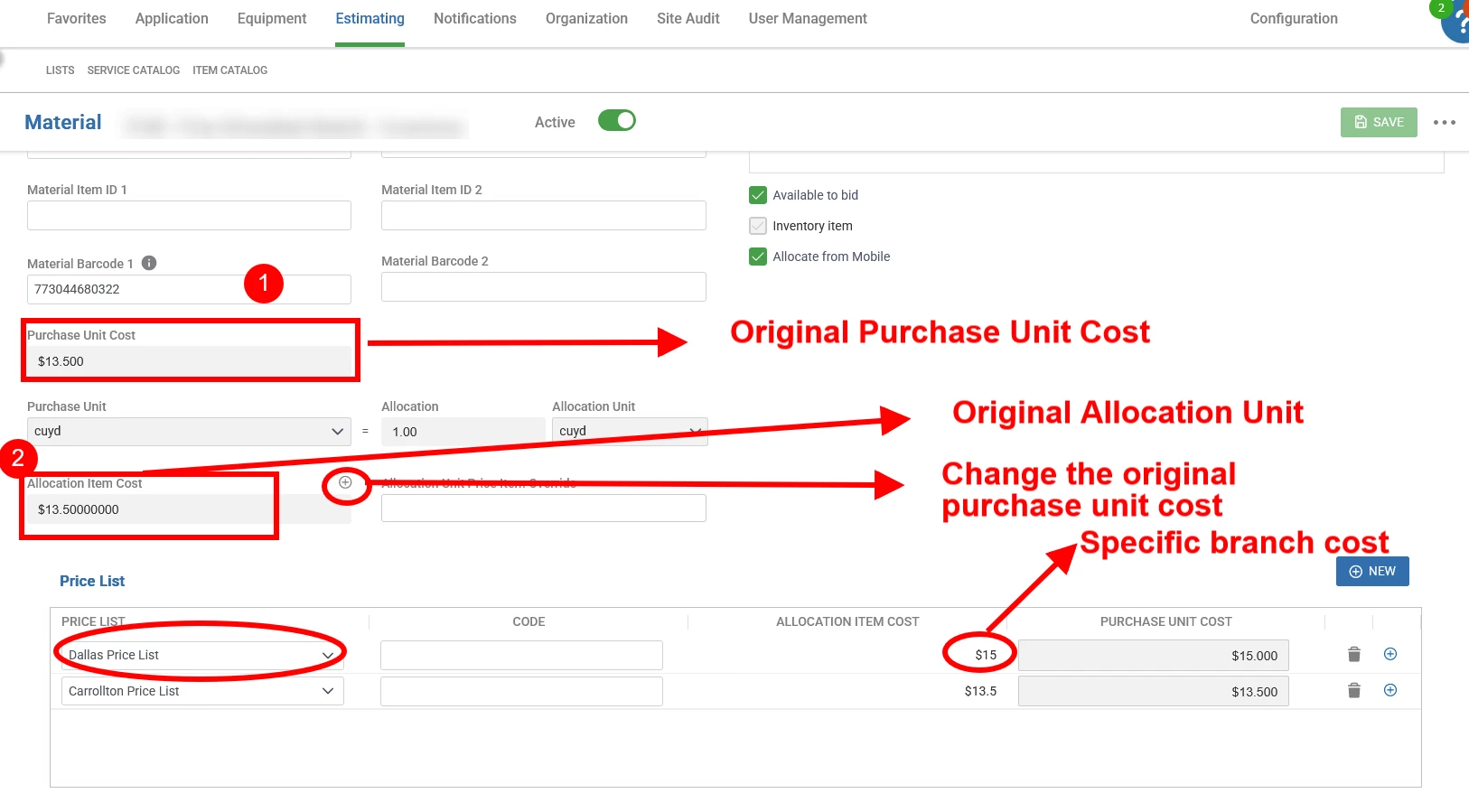
For exam, this item was sold mainly for $13.5 per cubic yard.  (this is the original cost or the cost for main branch)


But, it costs more at the one specific branch, then you will use the price list to specify the cost, to be $15 per cubic yard. 


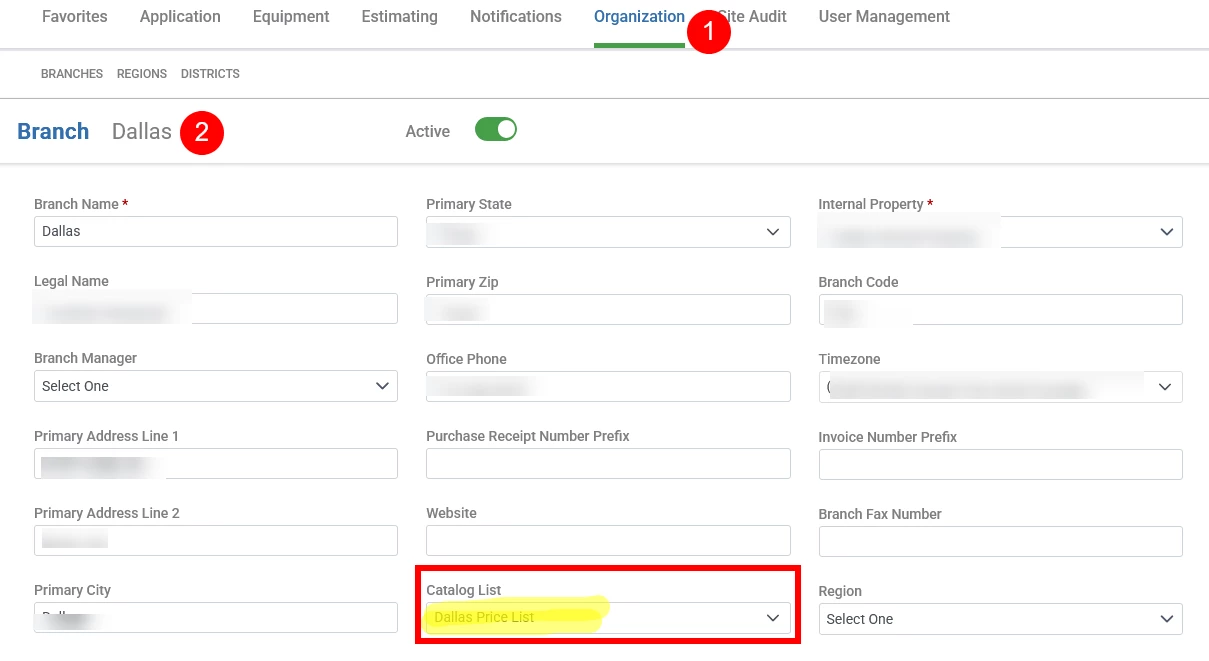
To enable this feature, you must setup your branch as well.  See below setting. 


For an estimate, if the branch is in Dallas, it will use the price list Dallas specific price, such as $15 per cubic yard, 
If the item does not have the price list, it will use the main branch cost or the original purchase cost. the number #1 filed on above first screenshot. 

 There is a trash can button at the price list row and you can always delete. 

Still use this as an example, if one day we get this item can be sold as $13.5 per cubic yard. We can simply delete the price list and the system will use the main cost. 

The price list is used only if you have multiple purchase cost for different branches.  (It only regarding how much you pay for the material). The price is calculated based on the pricing markup.
 

Hope this help. 


Kbaird
Forum|alt.badge.img+17
  • Inspiring
  • December 16, 2025

Hi Keithw, 


Price list is a function for item cost override. 

For exam, this item was sold mainly for $13.5 per cubic yard.  (this is the original cost or the cost for main branch)


But, it costs more at the one specific branch, then you will use the price list to specify the cost, to be $15 per cubic yard. 


To enable this feature, you must setup your branch as well.  See below setting. 


For an estimate, if the branch is in Dallas, it will use the price list Dallas specific price, such as $15 per cubic yard, 
If the item does not have the price list, it will use the main branch cost or the original purchase cost. the number #1 filed on above first screenshot. 

 There is a trash can button at the price list row and you can always delete. 

Still use this as an example, if one day we get this item can be sold as $13.5 per cubic yard. We can simply delete the price list and the system will use the main cost. 

The price list is used only if you have multiple purchase cost for different branches.  (It only regarding how much you pay for the material). The price is calculated based on the pricing markup.
 

Hope this help. 

This better get marked “Best answer”


baraica
Community Manager
Forum|alt.badge.img+28
  • Community Manager
  • December 16, 2025

Wait, everyone has the capability to mark as a best answer as long as your are logged in! Do you see the feature on your end? 👀


Forum|alt.badge.img+11
  • Author
  • Participating Frequently
  • December 17, 2025

Thank you ​@SoboYiW.  I sincerely appreciate your obvious diligence in replying.

I remain curious though why no one seems to see the problem with calling a Cost List a “Price List”.

“The price list is used only if you have multiple purchase cost for different branches.  (It only regarding how much you pay for the material). The price is calculated based on the pricing markup [ i.e. not in the Price List ].”

Anyone with bookkeeping/accounting experience knows - and appreciates - the profound difference between a cost and a price.  At least I have a better understanding of the function of the "Price List”.

Thank you again.


Kbaird
Forum|alt.badge.img+17
  • Inspiring
  • December 17, 2025

Wait, everyone has the capability to mark as a best answer as long as your are logged in! Do you see the feature on your end? 👀

If I make the post, yes. 


SoboYiW
Forum|alt.badge.img+21
  • Brainy
  • December 18, 2025

@Kbaird  Thank you for your kind reply. I really appreciate. 


@keithw Please submit this request on idea portal. I will invite all the voters to vote on it!

Cost list will avoid confusion. I was having the same wonder when I first saw “price list”. 


Forum|alt.badge.img+11
  • Author
  • Participating Frequently
  • December 18, 2025

Sorry, I guess, ​@SoboYiW...I don’t know what the Idea Portal is.


SoboYiW
Forum|alt.badge.img+21
  • Brainy
  • December 19, 2025

Sorry, I guess, ​@SoboYiW...I don’t know what the Idea Portal is.

This article has detailed info about idea portal. You may contact with your client success manager and check how many votes with your account. 


https://guide.youraspire.com/docs/all-about-the-idea-voting-portal