Solved

Drive Time In Time and Materials Opportunities

  • February 25, 2026
  • 3 replies
  • 27 views

Forum|alt.badge.img+7

Is there a way to set up a Time and Materials on Completion Opportunity so that drive time allocated to each ticket is not part of the hours calculation? For our T&M jobs, we are considering charging a flat “mobilization fee” rather than including drive time in the labor hours billed for the job. This is mostly due to how Aspire allocates drive time, we just want to be consistent with how much we charge customers rather than allowing Aspire to calculate the time. Our customers really like to dispute their bills, and when they see us on their property for 2 hours but get charged for more because a averaged/random/blended amount of drive time gets added as part of the labor hours, they get confused and combative.

I know I can manually change the amount of hours in the invoice batch before sending to be the “Onsite Time”, but I was wondering if there is a way for that to happen automatically, so that there’s less need for manual action to be taken on the invoices, and less chance for changing the hours to be forgotten, and then the customer gets charged a mobilization fee AND drive time. 

Best answer by Caren Bueno

That is such a great question and honestly, we ran into the exact same challenge.

We also had situations where customers would question the labor hours because what they “saw” onsite did not match what Aspire calculated once drive time was blended in. It created unnecessary friction.

The workaround we landed on (credit to my amazing boss for this one) was:

• We created a fixed “Mobilization Fee” as a material item

• The technician or the person approving time then adds the fixed mobilization fee to the ticket
• After time entry approval, we change the pay code for drive time to zero so it does not bill out as labor

This way:

  • Labor reflects true onsite time

  • Drive time is not automatically blended into billable labor

  • Customers see a clear, consistent flat mobilization fee

  • There is less confusion and less room for disputes

It is not fully automated, but it gave us more control and consistency. It also made conversations with customers much easier because everything is clearly itemized.

Hope this helps and I would love to hear if anyone has found a more automated solution, always open to learn new processes.

3 replies

Caren Bueno
Forum|alt.badge.img+7
  • Inspiring
  • Answer
  • February 25, 2026

That is such a great question and honestly, we ran into the exact same challenge.

We also had situations where customers would question the labor hours because what they “saw” onsite did not match what Aspire calculated once drive time was blended in. It created unnecessary friction.

The workaround we landed on (credit to my amazing boss for this one) was:

• We created a fixed “Mobilization Fee” as a material item

• The technician or the person approving time then adds the fixed mobilization fee to the ticket
• After time entry approval, we change the pay code for drive time to zero so it does not bill out as labor

This way:

  • Labor reflects true onsite time

  • Drive time is not automatically blended into billable labor

  • Customers see a clear, consistent flat mobilization fee

  • There is less confusion and less room for disputes

It is not fully automated, but it gave us more control and consistency. It also made conversations with customers much easier because everything is clearly itemized.

Hope this helps and I would love to hear if anyone has found a more automated solution, always open to learn new processes.


Forum|alt.badge.img+7
  • Author
  • Inspiring
  • February 25, 2026

That’s a really creative solution. I never thought about changing the pay code after time was approved, and that if you had a paycode for 0, it wouldn’t bill for that time. I’m definitely going to bring that to my team and see if they like that option more, however I forsee a sticking point around getting the invoices out timely, because we’d have to wait to invoice until after time is approved for payroll, however, it may just be a compromise we’re willing to make. Thank you for your help!


Caren Bueno
Forum|alt.badge.img+7
  • Inspiring
  • February 25, 2026

I really appreciate you saying that and I hope it helps in some way.

I completely understand your concern about timing and invoicing. Every team handles approvals a little differently, so it may take a little testing to see how it fits into your workflow. If you run into any specific questions as you think it through, I would be happy to assist.

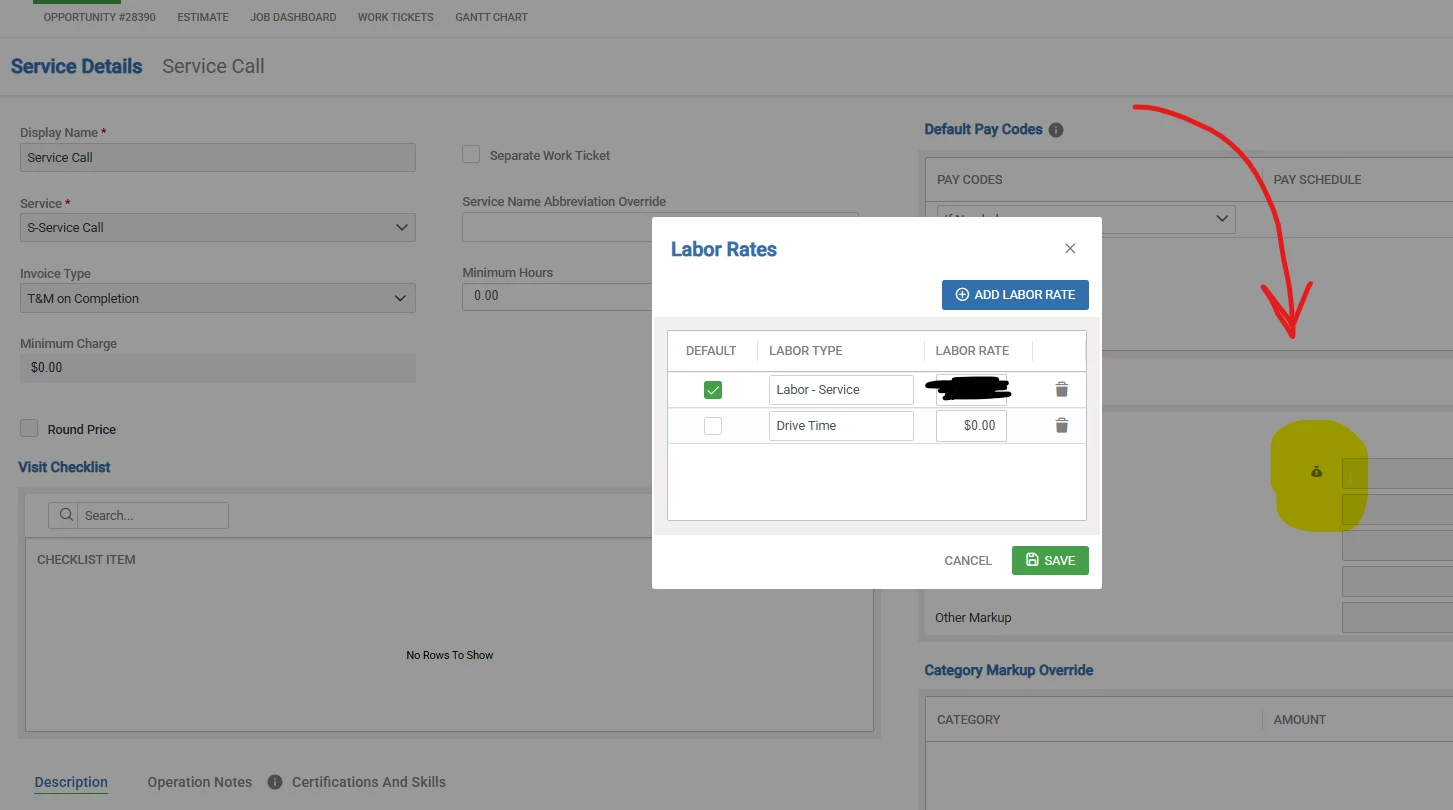
One thing that helped us reduce manual steps was setting it up directly in the opportunity template. When we built the template, we added the additional labor rate in the pricing table and set the Drive Time labor rate to $0.00 there. That way, you are not having to adjust it every time this situation comes up. 

It still requires some discipline in the approval process, but it brought more consistency for us.

Wishing you a great season ahead and good luck figuring out what works best for your team.

Always happy to compare notes.. lol